


Hikvision · Network Switch POE
Hikvision DS-3E1309P-EI/M 8-Port Fast Ethernet Smart PoE Switch
Model: DS-3E1309P-EI/M
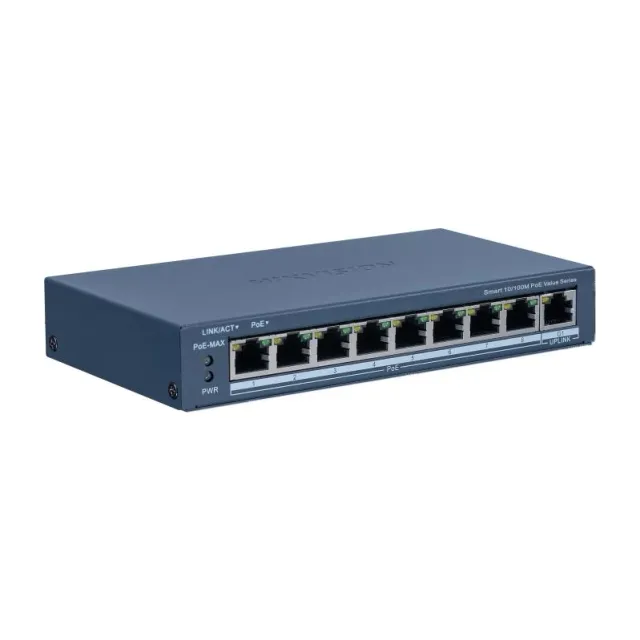

Product images are illustrative; appearance may vary.
2 Years Warranty
In stock
- 8 × 10/100 Mbps PoE + 1 × Gigabit RJ45 uplink8 × 10/100 Mbps PoE + 1 × Gigabit RJ45 uplink සම්බන්ධතා
- 60 W shared PoE power budget60 W මුළු PoE power budget එකක්
- Separate uplinks: 1 × Gigabit RJ45වෙනම uplink සම්බන්ධතා: 1 × Gigabit RJ45
- Smart management, VLAN and PoE watchdogVLAN සහ PoE watchdog සහිත smart management
Product detailsනිෂ්පාදන විස්තර
Hikvision DS-3E1309P-EI/M is a 8-port Fast Ethernet smart PoE switch with a Gigabit uplink.Hikvision DS-3E1309P-EI/M Gigabit uplink එකක් සහ PoE ports 8ක් ඇති Fast Ethernet smart switch එකකි.
Use the 8 PoE access ports for compatible powered devices and the 1 × Gigabit RJ45 uplinks for the rest of the network. The 60 W budget is shared across all PoE devices; check each device’s maximum draw before choosing the camera count.ගැළපෙන powered devices සඳහා PoE ports 8 භාවිතා කරන්න. Network එකට සම්බන්ධ කිරීමට 1 × Gigabit RJ45 uplinks තියෙනවා. 60 W power budget එක සියලු PoE devices අතර බෙදෙන නිසා camera ගණන තීරණය කිරීමට පෙර ඒවාට අවශ්ය උපරිම විදුලිය බලන්න.
The PoE access ports are Fast Ethernet (10/100 Mbps). A Gigabit uplink, where specified, does not turn the camera ports into Gigabit ports.PoE access ports 10/100 Mbps Fast Ethernet වේගයෙන් ක්රියා කරයි. Gigabit uplink එකක් තිබුණත් camera ports Gigabit වෙන්නේ නැහැ.
Plan cable quality, run length and uplink bandwidth for the connected cameras. Long-range mode, where supported, depends on the camera and cable and can reduce link speed. Use the normal Ethernet distance unless the installation has been checked for the selected mode.Camera සඳහා cable quality, දුර සහ uplink bandwidth ගැළපෙනවද බලන්න. Long-range mode එක model එකේ තියෙනවා නම් එහි ප්රතිඵල camera එක සහ cable එක අනුව වෙනස් වන අතර link speed අඩු විය හැක. Long-range setup එක තහවුරු කර නැත්නම් සාමාන්ය Ethernet දුර සීමාව අනුව සැලසුම් කරන්න.
Confirm the hardware revision, required accessories and installation with H Zone before ordering. Warranty information, when available, is shown with the current product listing.ඇණවුමට පෙර hardware revision එක, අවශ්ය accessories සහ installation එක H Zone වෙතින් තහවුරු කරගන්න. Warranty විස්තර තිබෙන විට current product listing එකේ පෙන්වයි.
Specificationsතාක්ෂණික තොරතුරු
General / සාමාන්ය
| Shell | Metal material, fan-free design |
|---|---|
| Net Weight | 0.4 kg (0.9 lb) |
| Gross Weight | 0.9 kg (2.0 lb) |
| Dimensions (W × H × D) | 170.00 mm × 27.60 mm × 93.10 mm (6.69'' × 1.09'' × 3.67'') |
| Operating Temperature | 0 °C to 40 °C (32 °F to 104 °F) |
| Storage Temperature | -40 °C to 85 °C (-40 °F to 185 °F) |
| Operating Humidity | 5% to 95% (no condensation) |
| Relative Humidity | 5% to 95% (no condensation) |
| Power Supplyවිදුලි සැපයුම | 48VDC, 1.35A |
| Installation Mode | Desk-Mounted,Wall-Mounted |
| Max. Power Consumption | 65 W |
| Power Consumption in Idle | 5 W |
| Surge Protection | 6 kV |
Network Parameters / ජාල විස්තර
| Portsසම්බන්ධක | 8 × 10/100 Mbps PoE port,1 × Gigabit RJ45 port |
|---|---|
| MAC Address Table | 8 K |
| Switching CapacitySwitching ධාරිතාව | Whole-Device Performance: 5.6 Gbps Port Performance: 3.6 Gbps |
| Packet Forwarding Rate | Whole-Device Performance: 4.17 Mpps Port Performance: 2.68 Mpps |
| Internal Cache | 4 Mbits |
Software Function / Software පහසුකම්
| Long Range | Ports 1 to 8: up to 300 m. Long range performance may vary depend on camera model or cable condition. |
|---|---|
| HPP | Support one-click activation and remote management via Hik-Partner Pro. Functions supported: 1. Display the port rate. 2. Display the port bandwidth utilization rate. 3. Display the PoE power usage. 4. Display topology information. 5. Display the alarm status. 6. Restart ports and devices. 7. Enable port long-rage mode. 8. Remotely upgrade the device. |
| Port Isolation | Ports 1 to 8: port isolation mode to improve network security Ports in an isolation group cannot communicate with each other, but they can communicate with ports outside the isolation group. |
| System Maintenance | Support device management via web. Support DHCP Client. Enabled by default for dynamic assignment of management IP addresses. Support Super IP, which is a fixed IP address (10.180.190.200) for direct access. Support management via Hik-Central Pro. Support remote management via Hik-Partner Pro. Support cable detection. Abnormal open circuits and short circuits as well as network cable length can be detected. Support 802.1ab LLDP for peer device discovery. Support port mirroring for fault locating. |
| PoE Watchdog | Ports 1 to 8: auto detect and restart the cameras that do not respond. |
| Loop Prevention | Loop prevention is used to prevent the switching network from forming loops, which will seriously affect network communication. Disabled by default. Support 802.1D STP. Support 802.1w RSTP. |
| VLAN | VLAN is used for network scale planning and network health improvement. Support 802.1Q. Configurable VLAN ID from 1-4094. Support Trunk, Access port mode. Support Max. 4094 VLAN. |
PoE Power Supply / PoE විදුලි සැපයුම
| PoE StandardPoE සම්මතය | IEEE 802.3af,IEEE 802.3at |
|---|---|
| PoE Power Pin | 8-pin power: 1/2(-), 3/6(+), 4/5(+), 7/8(-) |
| PoE Port | PoE: Ports 1 to 8 |
| Max. Port Power | 30 W |
| PoE Power BudgetPoE විදුලි ධාරිතාව | 60 W |
Approval / සහතික
| EMC | CE-EMC (EN 55032: 2015+A11: 2020, EN IEC 61000-3-2: 2019, EN 61000-3-3: 2013+A1: 2019, EN 50130-4: 2011+A1: 2014, EN 55035: 2017+A11: 2020) |
|---|---|
| Safety | CB (AMD1:2009, AMD2:2013, IEC 62368-1: 2014 (Second Edition)), CE-LVD (EN 62368-1: 2014+A11: 2017) |
| Chemistry | CE-RoHS (2011/65/EU),WEEE (2012/19/EU),Reach (Regulation (EC) No.1907/2006) |
Selection notes / තෝරාගැනීමේදී
| Power planning | Total connected maximum load must fit the shared PoE budget |
|---|---|
| Compatibility | Confirm device PoE standard, cable and hardware revision |
Performance depends on installation and environmental conditions. Contact H Zone to confirm system compatibility.